> ## Documentation Index
> Fetch the complete documentation index at: https://docs.knotapi.com/llms.txt
> Use this file to discover all available pages before exploring further.
# Sending Card Data
> Learn how to securely send card data to Knot using JWE encryption, vault providers, or processor integrations.
## Overview
There are a few options for how you can send card data to Knot when integrating the CardSwitcher product. The first option is to to send the card data encrypted in a JWE, the second option is to send the card data in JSON to a secure endpoint controlled by a vault provider, and the third is to rely on one of Knot's direct processor integrations.
No option is more or less secure than the other, all maintain strict handling of the card data to comply with PCI guidelines, and all are valid options for sending card data to Knot.
## Send Encrypted Data Directly to Knot
This option is recommended.
In this option, you can encrypt the JSON payload of card data in a JWE format prior to sending it to Knot.
1. Get a JWE public key from Knot's [Retrieve JWK](/api-reference/products/card-switcher/retrieve-jwk) endpoint.
2. Encrypt the JSON string payload of the card data with the JWE public key (referenced [here](/api-reference/products/card-switcher/retrieve-jwk)).
3. Send the encrypted payload to [Switch Card (JWE)](/api-reference/products/card-switcher/switch-card-jwe).
4. Knot sends the encrypted data (the JWE) to a PCI-compliant vendor's environment.
5. Knot receives an alias associated with the encrypted card data.
Card data is never processed or stored outside PCI-compliant vendor environments. After card data is used for a card switch, it is explicitly deleted from the PCI-compliant vendor's vault within milliseconds.
### VGS JWE Encryption
If you already have a vault set up with Very Good Security (VGS), you can manipulate the payload and send the JWE directly from your VGS vault via an outbound route to the [Switch Card (JWE)](/api-reference/products/card-switcher/switch-card-jwe) endpoint. Please see the VGS StarLarky code sample below for guidance or reach out to the Knot team.
### Code Samples
Below are a number of code samples demonstrating how to structure and encrypt a JWE:
```typescript expandable TypeScript icon="node-js" theme={"system"}
import { CompactEncrypt, importJWK, JWK } from 'jose';
const KNOT_BASE = 'https://development.knotapi.com';
function basicAuthHeader(clientId: string, secret: string): string {
const creds = Buffer.from(`${clientId}:${secret}`, 'utf8').toString('base64');
return `Basic ${creds}`;
}
/**
* GetKey gets the JWK associated with your client ID from the Knot API.
* The implementation follows the steps outlined in the KnotAPI documentation:
* https://docs.knotapi.com/api-reference/products/card-switcher/retrieve-jwk
*/
export async function getKey(): Promise {
const clientId = process.env.KNOT_CLIENT_ID || '';
const secret = process.env.KNOT_SECRET || '';
if (!clientId || !secret) {
throw new Error('KNOT_CLIENT_ID and KNOT_SECRET must be set in the environment.');
}
const resp = await fetch(`${KNOT_BASE}/jwe/key`, {
method: 'GET',
headers: {
Authorization: basicAuthHeader(clientId, secret),
Accept: 'application/json',
},
});
if (!resp.ok) {
const text = await resp.text().catch(() => '');
throw new Error(`Failed to fetch JWK (${resp.status}): ${text}`);
}
const jwk = (await resp.json()) as JWK;
return jwk;
}
/**
* encryptData encrypts the card data using the provided JWK, the JWE must contain the JWK's "kid" and "alg" parameters to be considered valid.
* The implementation follows the steps outlined in the KnotAPI documentation:
* https://docs.knotapi.com/api-reference/products/card-switcher/retrieve-jwk#building-the-jwe
* You can also opt to implement these RFC's manually instead of using a library:
* https://datatracker.ietf.org/doc/html/rfc7516
* https://datatracker.ietf.org/doc/html/rfc7517
* https://datatracker.ietf.org/doc/html/rfc7518
* https://datatracker.ietf.org/doc/html/rfc7638
*/
export async function encryptData(cardData: unknown, jwk: JWK): Promise {
const alg = jwk.alg;
if (!alg) {
throw new Error('JWK is missing "alg" (required).');
}
// Import the public key from JWK for encryption
// jose infers the right key type/algorithm from JWK fields
const publicKey = await importJWK(jwk, alg);
const plaintext = new TextEncoder().encode(JSON.stringify(cardData));
const jwe = await new CompactEncrypt(plaintext)
.setProtectedHeader({
alg,
enc: 'A256GCM',
...(jwk.kid ? { kid: jwk.kid } : {}),
})
.encrypt(publicKey);
return jwe;
}
/**
* submitJWE Submits the JWE to the Knot API for an active task.
* The implementation follows the steps outlined in the KnotAPI documentation:
* https://docs.knotapi.com/api-reference/products/card-switcher/switch-card-jwe
*/
export async function submitJWE(taskId: string, jwe: string): Promise {
const clientId = process.env.KNOT_CLIENT_ID || '';
const secret = process.env.KNOT_SECRET || '';
if (!clientId || !secret) {
throw new Error('KNOT_CLIENT_ID and KNOT_SECRET must be set in the environment.');
}
console.log(`Submitting JWE: ${jwe}`);
const resp = await fetch(`${KNOT_BASE}/card`, {
method: 'POST',
headers: {
Authorization: basicAuthHeader(clientId, secret),
'Content-Type': 'application/json',
Accept: 'application/json',
},
body: JSON.stringify({ task_id: taskId, jwe }),
});
const text = await resp.text().catch(() => '');
// Try parse JSON if possible for error_message
let parsed: Record | null = null;
try { parsed = text ? JSON.parse(text) : null; } catch {}
if (!resp.ok) {
const msg = parsed?.error_message ?? (text || `HTTP ${resp.status}`);
throw new Error(String(msg));
}
const errorMessage = (parsed?.error_message as string | undefined) ?? undefined;
if (errorMessage) {
throw new Error(errorMessage);
}
}
async function main() {
/**
* Hardcoded card data for demonstration purposes.
* You should use your own card data.
* See the KnotAPI documentation for more information:
* https://docs.knotapi.com/api-reference/products/card-switcher/retrieve-jwk#building-the-jwe
*/
const cardData = {
user: {
name: {
first_name: 'Ada', // Max length: 255
last_name: 'Lovelace', // Max length: 255
},
address: {
street: '100 Main Street', // Max length: 46
street2: '#100', // Max length: 46
city: 'NEW YORK', // Max length: 32
region: 'NY', // Must be an ISO 3166-2 sub-division code
postal_code: '12345', // Min length: 5, Max length: 10
country: 'US', // Must be an ISO 3166-1 alpha-2 code
},
phone_number: '+11234567890', // Must be in E.164 format
},
card: {
number: '4242424242424242', // Card number
expiration: '08/2030', // MM/YYYY or MM/YY format
cvv: '012', // Max length: 4
},
};
const jwk = await getKey();
const jwe = await encryptData(cardData, jwk);
await submitJWE('123456', jwe);
}
if (require.main === module) {
main().catch((err) => {
console.error(err);
process.exit(1);
});
}
```
```python expandable Python icon="python" theme={"system"}
from __future__ import annotations
import json
import os
from typing import Any, Dict
import requests
from jose import jwe # python-jose
# pip install "python-jose[cryptography]" requests
KNOT_BASE = "https://development.knotapi.com"
def _auth_tuple() -> tuple[str, str]:
cid = os.getenv("KNOT_CLIENT_ID")
sec = os.getenv("KNOT_SECRET")
if not cid or not sec:
raise RuntimeError("KNOT_CLIENT_ID or KNOT_SECRET is missing in the environment")
return cid, sec
def get_key() -> Dict[str, Any]:
"""
GetKey gets the JWK associated with your client ID from the Knot API.
The implementation follows the steps outlined in the KnotAPI documentation:
https://docs.knotapi.com/api-reference/products/card-switcher/retrieve-jwk
Returns the JWK JSON as a Python dict (suitable for python-jose).
"""
resp = requests.get(f"{KNOT_BASE}/jwe/key", auth=_auth_tuple(), timeout=30)
if not resp.ok:
raise RuntimeError(f"GetKey failed: {resp.status_code} {resp.text}")
jwk = resp.json() # python-jose accepts a JWK dict as the key parameter
return jwk
def encrypt_data(card_data: Dict[str, Any], jwk_dict: Dict[str, Any]) -> str:
"""
encrypt_data encrypts the card data using the provided JWK, the JWE must contain the JWK's "kid" and "alg" parameters to be considered valid.
The implementation follows the steps outlined in the KnotAPI documentation:
https://docs.knotapi.com/api-reference/products/card-switcher/retrieve-jwk#building-the-jwe
You can also opt to implement these RFC's manually instead of using a library:
https://datatracker.ietf.org/doc/html/rfc7516
https://datatracker.ietf.org/doc/html/rfc7517
https://datatracker.ietf.org/doc/html/rfc7518
https://datatracker.ietf.org/doc/html/rfc7638
"""
plaintext = json.dumps(card_data).encode("utf-8")
return jwe.encrypt(
plaintext,
jwk_dict, # JWK dict (python-jose derives the key)
algorithm=jwk_dict.get("alg"),
encryption="A256GCM",
kid=jwk_dict.get("kid")
).decode("utf-8")
def submit_jwe(task_id: str, compact_jwe: str) -> None:
"""
submit_jwe Submits the JWE to the Knot API for an active task.
The implementation follows the steps outlined in the KnotAPI documentation:
https://docs.knotapi.com/api-reference/products/card-switcher/switch-card-jwe
"""
payload = {"task_id": task_id, "jwe": compact_jwe}
resp = requests.post(
f"{KNOT_BASE}/card",
auth=_auth_tuple(),
json=payload,
headers={"Content-Type": "application/json"},
timeout=30,
)
body_text = resp.text or ""
try:
parsed = resp.json() if body_text else {}
except Exception:
parsed = {}
if not resp.ok:
msg = parsed.get("error_message") or f"{resp.status_code} {resp.reason}"
raise RuntimeError(f"SubmitJWE failed: {msg}")
if parsed.get("error_message"):
raise RuntimeError(parsed["error_message"])
def main() -> None:
card_data: Dict[str, Any] = {
"user": {
"name": {
"first_name": "Ada", # Max length: 255
"last_name": "Lovelace", # Max length: 255
},
"address": {
"street": "100 Main Street", # Max length: 46
"street2": "#100", # Max length: 46
"city": "NEW YORK", # Max length: 32
"region": "NY", # Must be an ISO 3166-2 sub-division code
"postal_code": "12345", # Min length: 5, Max length: 10
"country": "US", # Must be an ISO 3166-1 alpha-2 code
},
"phone_number": "+11234567890", # Must be in E.164 format
},
"card": {
"number": "4242424242424242", # Card number
"expiration": "08/2030", # MM/YYYY or MM/YY format
"cvv": "012", # Max length: 4
},
}
jwk_dict = get_key()
compact_jwe = encrypt_data(card_data, jwk_dict)
submit_jwe("123456", compact_jwe)
if __name__ == "__main__":
main()
```
```go expandable Go icon="golang" theme={"system"}
package main
import (
"bytes"
"encoding/json"
"fmt"
"io"
"net/http"
"os"
"github.com/lestrrat-go/jwx/v3/jwe"
"github.com/lestrrat-go/jwx/v3/jwk"
)
/*
GetKey gets the JWK associated with your client ID from the Knot API.
The implementation follows the steps outlined in the KnotAPI documentation:
https://docs.knotapi.com/api-reference/products/card-switcher/retrieve-jwk
*/
func GetKey() (jwk.Key, error) {
req, err := http.NewRequest(http.MethodGet, "https://development.knotapi.com/jwe/key", nil)
if err != nil {
return nil, err
}
req.SetBasicAuth(os.Getenv("KNOT_CLIENT_ID"), os.Getenv("KNOT_SECRET"))
resp, err := http.DefaultClient.Do(req)
if err != nil {
return nil, err
}
defer resp.Body.Close()
body, err := io.ReadAll(resp.Body)
if err != nil {
return nil, err
}
parsedKey, err := jwk.ParseKey(body)
if err != nil {
return nil, err
}
return parsedKey, nil
}
/*
EncryptData encrypts the card data using the provided JWK, the JWE must contain the JWK's "kid" and "alg" parameters to be considered valid.
The implementation follows the steps outlined in the KnotAPI documentation:
https://docs.knotapi.com/api-reference/products/card-switcher/retrieve-jwk#building-the-jwe
You can also opt to implement these RFC's manually instead of using a library:
https://datatracker.ietf.org/doc/html/rfc7516
https://datatracker.ietf.org/doc/html/rfc7517
https://datatracker.ietf.org/doc/html/rfc7518
https://datatracker.ietf.org/doc/html/rfc7638
*/
func EncryptData(cardData map[string]any, parsedKey jwk.Key) ([]byte, error) {
plaintext, err := json.Marshal(cardData)
if err != nil {
return nil, err
}
algo, ok := parsedKey.Algorithm()
if !ok {
return nil, fmt.Errorf("key does not have an algorithm")
}
return jwe.Encrypt(plaintext, jwe.WithKey(algo, parsedKey))
}
/*
SubmitJWE Submits the JWE to the Knot API for an active task.
The implementation follows the steps outlined in the KnotAPI documentation:
https://docs.knotapi.com/api-reference/products/card-switcher/switch-card-jwe
*/
func SubmitJWE(taskId string, cipherText []byte) error {
payload := map[string]string{
"task_id": taskId,
"jwe": string(cipherText),
}
payloadBytes, err := json.Marshal(&payload)
if err != nil {
return err
}
req, err := http.NewRequest(http.MethodPost, "https://development.knotapi.com/card", bytes.NewReader(payloadBytes))
if err != nil {
return err
}
req.SetBasicAuth(os.Getenv("KNOT_CLIENT_ID"), os.Getenv("KNOT_SECRET"))
resp, err := http.DefaultClient.Do(req)
if err != nil {
return err
}
defer resp.Body.Close()
body, err := io.ReadAll(resp.Body)
if err != nil {
return err
}
parsedBody := map[string]string{}
err = json.Unmarshal(body, &parsedBody)
if err != nil {
return err
}
errorMessage, ok := parsedBody["error_message"]
if ok {
return fmt.Errorf(errorMessage)
}
return nil
}
func main() {
/*
Hardcoded card data for demonstration purposes.
You should use your own card data.
See the KnotAPI documentation for more information:
https://docs.knotapi.com/api-reference/products/card-switcher/retrieve-jwk#building-the-jwe
*/
cardData := map[string]any{
"user": map[string]any{
"name": map[string]string{
"first_name": "Ada", // Max length: 255
"last_name": "Lovelace", // Max length: 255
},
"address": map[string]string{
"street": "100 Main Street", // Max length: 46
"street2": "#100", // Max length: 46
"city": "NEW YORK", // Max length: 32
"region": "NY", // Must be an ISO 3166-2 sub-division code
"postal_code": "12345", // Min length: 5, Max length: 10
"country": "US", // Must be an ISO 3166-1 alpha-2 code
},
"phone_number": "+11234567890", // Must be in E.164 format
},
"card": map[string]string{
"number": "4242424242424242",
"expiration": "08/2030", // MM/YYYY or MM/YY format
"cvv": "012", // Max length: 4
},
}
parsedKey, err := GetKey()
if err != nil {
panic(err)
}
cipherText, err := EncryptData(cardData, parsedKey)
if err != nil {
panic(err)
}
err = SubmitJWE("123456", cipherText)
if err != nil {
panic(err)
}
}
```
```python expandable VGS StarLarky icon="star" theme={"system"}
load('@stdlib//json', 'json')
load('@vgs//vault', 'vault')
load('@vendor//jose/jwe', 'jwe')
def _reveal_card_fields(card):
return {
"number": vault.reveal(card["number"]),
"expiration": vault.reveal(card["expiration"]),
"cvv": vault.reveal(card["cvv"]),
}
def _encrypt_jwe(jwk, plaintext_bytes):
"""
_encrypt_jwe encrypts the card data using the provided JWK, the JWE must contain the JWK's "kid" and "alg" parameters to be considered valid.
"""
return jwe.encrypt(
plaintext_bytes,
jwk,
algorithm=jwk["alg"],
encryption="A256GCM",
kid=jwk["kid"]
)
def process(input, ctx):
# input.body is a string (JSON). Example:
# {
# "jwk": { "kty": "...", "alg": "RSA-OAEP-256", "n": "...", "e": "...", "kid": "..." }, (retrieved from https://development.knotapi.com/jwe/key)
# "user": {
# "name": {
# "first_name": "Ada", # Max length: 255
# "last_name": "Lovelace" # Max length: 255
# },
# "address": {
# "street": "100 Main Street", # Max length: 46
# "street2": "#100", # Max length: 46
# "city": "NEW YORK", # Max length: 32
# "region": "NY", # ISO 3166-2 sub-division
# "postal_code": "12345", # Min 5, Max 10
# "country": "US" # ISO 3166-1 alpha-2
# },
# "phone_number": "+11234567890" # E.164
# },
# "card": {
# "number": "tok_sandbox_...",
# "expiration": "tok_sandbox_...", # MM/YYYY MM/YY
# "cvv": "tok_sandbox_..." # Max length: 4
# }
# }
body = json.loads(input.body)
jwk = body["jwk"]
user = body["user"]
card = body["card"]
revealed_card = _reveal_card_fields(card)
card_data = {"user": user, "card": revealed_card}
plaintext = json.dumps(card_data).encode("utf-8")
encrypted_jwe = _encrypt_jwe(jwk, plaintext)
input.body = encrypted_jwe
input.headers["Content-Type"] = "text/plain"
return input
```
```java expandable Java icon="java" theme={"system"}
package com.knotapi;
import com.fasterxml.jackson.core.type.TypeReference;
import com.fasterxml.jackson.databind.ObjectMapper;
import com.nimbusds.jose.*;
import com.nimbusds.jose.crypto.*;
import com.nimbusds.jose.jwk.*;
import java.net.URI;
import java.net.http.HttpClient;
import java.net.http.HttpRequest;
import java.net.http.HttpResponse;
import java.nio.charset.StandardCharsets;
import java.util.Base64;
import java.util.LinkedHashMap;
import java.util.Map;
public class Main {
private static final String KNOT_BASE = "https://development.knotapi.com";
private static final ObjectMapper MAPPER = new ObjectMapper();
private static final HttpClient HTTP = HttpClient.newHttpClient();
/** Get the JWK associated with your client ID from the Knot API.
* The implementation follows the steps outlined in the KnotAPI documentation:
* https://docs.knotapi.com/api-reference/products/card-switcher/retrieve-jwk
*/
public static JWK getKey() throws Exception {
String id = System.getenv("KNOT_CLIENT_ID");
String secret = System.getenv("KNOT_SECRET");
if (id == null || secret == null) {
throw new IllegalStateException("KNOT_CLIENT_ID or KNOT_SECRET missing");
}
String basic = "Basic " + Base64.getEncoder()
.encodeToString((id + ":" + secret).getBytes(StandardCharsets.UTF_8));
HttpRequest req = HttpRequest.newBuilder()
.uri(URI.create(KNOT_BASE + "/jwe/key"))
.header("Authorization", basic)
.GET()
.build();
HttpResponse resp = HTTP.send(req, HttpResponse.BodyHandlers.ofString());
if (resp.statusCode() / 100 != 2) {
throw new RuntimeException("GetKey failed: " + resp.statusCode() + " " + resp.body());
}
// Parse JWK directly from JSON string
return JWK.parse(resp.body());
}
/** Select a JWEEncrypter that matches the provided JWK and alg. */
private static JWEEncrypter encrypterFor(JWK jwk, JWEAlgorithm alg) throws Exception {
// Always use a public key for asymmetric encryption
if (jwk instanceof RSAKey) {
RSAKey rsa = (RSAKey) ((RSAKey) jwk).toPublicJWK();
return new RSAEncrypter(rsa);
}
if (jwk instanceof ECKey) {
ECKey ec = (ECKey) ((ECKey) jwk).toPublicJWK();
return new ECDHEncrypter(ec);
}
if (jwk instanceof OctetSequenceKey) {
OctetSequenceKey oct = (OctetSequenceKey) jwk;
byte[] keyBytes = oct.toByteArray();
if (JWEAlgorithm.DIR.equals(alg)) {
return new DirectEncrypter(keyBytes);
}
return new AESEncrypter(keyBytes);
}
throw new JOSEException("Unsupported JWK type: " + jwk.getKeyType());
}
/** encryptData encrypts the card data using the provided JWK, the JWE must contain the JWK's "kid" and "alg" parameters to be considered valid.
* The implementation follows the steps outlined in the KnotAPI documentation:
* https://docs.knotapi.com/api-reference/products/card-switcher/retrieve-jwk#building-the-jwe
* You can also opt to implement these RFC's manually instead of using a library:
* https://datatracker.ietf.org/doc/html/rfc7516
* https://datatracker.ietf.org/doc/html/rfc7517
* https://datatracker.ietf.org/doc/html/rfc7518
* https://datatracker.ietf.org/doc/html/rfc7638
*/
public static String encryptData(Map cardData, JWK jwk) throws Exception {
byte[] plaintext = MAPPER.writeValueAsBytes(cardData);
// Use alg from the JWK; enc = A256GCM (adjust if your server requires a different enc)
if (jwk.getAlgorithm() == null) throw new IllegalStateException("JWK missing 'alg'");
JWEAlgorithm alg = JWEAlgorithm.parse(jwk.getAlgorithm().getName());
JWEHeader header = new JWEHeader.Builder(alg, EncryptionMethod.A256GCM)
.keyID(jwk.getKeyID()) // include kid if present
.contentType(null) // no nested JWT
.build();
JWEObject jwe = new JWEObject(header, new Payload(plaintext));
JWEEncrypter encrypter = encrypterFor(jwk, alg);
jwe.encrypt(encrypter);
return jwe.serialize();
}
/** submitJWE Submits the JWE to the Knot API for an active task.
* The implementation follows the steps outlined in the KnotAPI documentation:
* https://docs.knotapi.com/api-reference/products/card-switcher/switch-card-jwe
*/
public static void submitJWE(String taskId, String compactJWE) throws Exception {
String id = System.getenv("KNOT_CLIENT_ID");
String secret = System.getenv("KNOT_SECRET");
if (id == null || secret == null) {
throw new IllegalStateException("KNOT_CLIENT_ID or KNOT_SECRET missing");
}
String basic = "Basic " + Base64.getEncoder()
.encodeToString((id + ":" + secret).getBytes(StandardCharsets.UTF_8));
Map payload = Map.of(
"task_id", taskId,
"jwe", compactJWE
);
String json = MAPPER.writeValueAsString(payload);
HttpRequest req = HttpRequest.newBuilder()
.uri(URI.create(KNOT_BASE + "/card"))
.header("Authorization", basic)
.header("Content-Type", "application/json")
.POST(HttpRequest.BodyPublishers.ofString(json))
.build();
HttpResponse resp = HTTP.send(req, HttpResponse.BodyHandlers.ofString());
String body = resp.body();
// Try to parse JSON body for error_message (even on non-2xx)
Map parsed = Map.of();
try {
if (body != null && !body.isEmpty()) {
parsed = MAPPER.readValue(body, new TypeReference>() {});
}
} catch (Exception ignored) {}
if (resp.statusCode() / 100 != 2) {
Object msg = parsed.getOrDefault("error_message", resp.statusCode() + " " + resp.body());
throw new RuntimeException("SubmitJWE failed: " + msg);
}
if (parsed.containsKey("error_message")) {
throw new RuntimeException(String.valueOf(parsed.get("error_message")));
}
}
static void main() throws Exception {
/**
* Hardcoded card data for demonstration purposes.
* You should use your own card data.
* See the KnotAPI documentation for more information:
* https://docs.knotapi.com/api-reference/products/card-switcher/retrieve-jwk#building-the-jwe
*/
Map name = new LinkedHashMap<>();
name.put("first_name", "Ada"); // Max length: 255
name.put("last_name", "Lovelace"); // Max length: 255
Map address = new LinkedHashMap<>();
address.put("street", "100 Main Street"); // Max length: 46
address.put("street2", "#100"); // Max length: 46
address.put("city", "NEW YORK"); // Max length: 32
address.put("region", "NY"); // ISO 3166-2 sub-division
address.put("postal_code", "12345"); // Min 5, Max 10
address.put("country", "US"); // ISO 3166-1 alpha-2
Map user = new LinkedHashMap<>();
user.put("name", name);
user.put("address", address);
user.put("phone_number", "+11234567890"); // E.164 format
Map card = new LinkedHashMap<>();
card.put("number", "4242424242424242");
card.put("expiration", "08/2030"); // MM/YYYY or MM/YY
card.put("cvv", "012"); // Max length: 4
Map cardData = new LinkedHashMap<>();
cardData.put("user", user);
cardData.put("card", card);
JWK jwk = getKey();
String jwe = encryptData(cardData, jwk);
submitJWE("123456", jwe);
}
}
```
## Send Data to Secure Vault Provider
This option is often chosen by those integrating with Knot that already have a vault set up with a PCI-compliant vendor such as Very Good Security (VGS) or Basis Theory.
1. Set up a route to Knot's [Switch Card](/api-reference/products/card-switcher/switch-card) endpoint from the vault that stores card data at your PCI-compliant vendor.
2. When you receive the `AUTHENTICATED` webhook, make a request to the vault.
3. The vault provider will send the necessary card data to Knot's [Switch Card](/api-reference/products/card-switcher/switch-card) endpoint in JSON.
4. Knot receives the card data to the aforementioned endpoint. **This endpoint is controlled by Knot's PCI-compliant vendor which stores the data and proxies it to Knot via an alias.**
Card data is never processed or stored outside PCI-compliant vendor environments. After card data is used for a card switch, it is explicitly deleted from the PCI-compliant vendor's vault within milliseconds.
You can also request to enable [Mutual Transport Layer Security (mTLS)](/api-reference/mTLS) for the [Switch Card](/api-reference/products/card-switcher/switch-card) endpoint as an additional security measure if desired.
### VGS 1-Click Route Setup
Knot partners with [VGS](https://www.verygoodsecurity.com/) (a PCI-compliant vendor) to streamline the process of sending card data in a PCI-compliant manner as part of your integration with Knot.
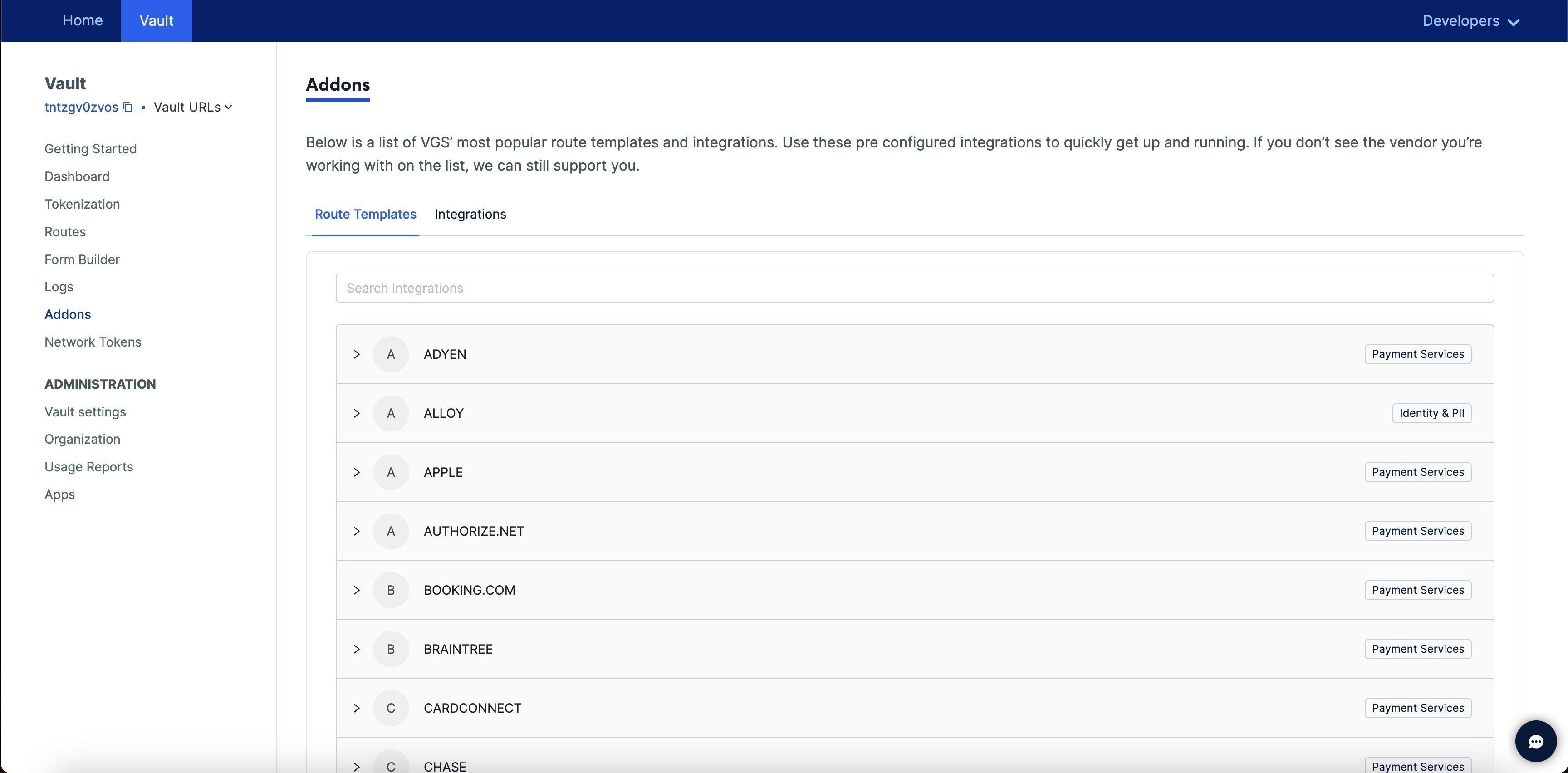
Within your VGS account online, you can setup an outbound route to Knot's [Switch Card](/api-reference/products/card-switcher/switch-card) endpoint. VGS specifies how to set up an outbound connection to a 3rd party (in this case Knot) [here](https://www.verygoodsecurity.com/docs/guides/outbound-connection#outbound-connection). Doing so will allow you to automatically route card data stored in your VGS vault to Knot. To make this process even easier, in the "Addons" section of your vault in your VGS account online, you will find a set of "route templates." You can search for and select the "KnotAPI" route template to get started.
 ## Direct Processor Integrations
### Unit
With this option, you can allow Knot to retrieve the card data directly from Unit if you use their software as your issuer processor. More on this integration [here](/card-switcher/processor-digital-banking-integrations/unit).
### I2C
With this option, you can allow Knot to retrieve the card data directly from Unit if you use their software as your issuer processor. More on this integration [here](/card-switcher/processor-digital-banking-integrations/i2c).
## Direct Processor Integrations
### Unit
With this option, you can allow Knot to retrieve the card data directly from Unit if you use their software as your issuer processor. More on this integration [here](/card-switcher/processor-digital-banking-integrations/unit).
### I2C
With this option, you can allow Knot to retrieve the card data directly from Unit if you use their software as your issuer processor. More on this integration [here](/card-switcher/processor-digital-banking-integrations/i2c).